
10-Days of learning — Day 9 — Packing and Obfuscation Techniques

Time to learn a little about “packing and obfuscation” techniques, those are used to make the code harder to understand by malicious actors or defense actors, these techniques are designed to make the code non readable and harder to perform a reverse engineer attack.
Why this is important? Well, packing and obfuscating techniques are crucial because they help to protect the confidentiality, integrity and availability of the system and its resources, by making the code less readable and/or harder to be analyzed, these techniques prevent the tampering of the code or any modification to it.
Let s discuss some of the techniques can be used for this purpose:
- Code Packing: This process refers when the code is compressed or encrypted to reduce it size. This can be done to make the code less noticeable and harder to analyze meaning if the app or script is analyzed instead of clear text, the person who analyzes it will find something that is not comprehensible (at least for human eyes).
- Code Obfuscation: This is more common technique to avoid signature detections, it requires to make the code harder to read by renaming variables, functions, classes, using complex data structures or adding unnecessary code. As mentioned before, the goal is to make it harder to be understood.
- Anti-Disassembly Techniques: These are techniques that will apply when an attacker wants to decompile or disassemble our program, and can be splitted in deveral ways:
- Encrypting the code or data.
- Adding self-modifying code.
- Using obfuscated or unreadable code.
- Implementing anti-disassembly hooks.
As you know in my posts I love to include some code snippets so the lessons can be understand better, here is some simple examples to analyze.

Code Packing Script
The first script demonstrates code packing by compressing the code using the zlib library.
import zlib

def compress_code(code):
    # Compress the code using zlib
    compressed_code = zlib.compress(code.encode())
    return compressed_code

def decompress_code(compressed_code):
    # Decompress the code using zlib
    decompressed_code = zlib.decompress(compressed_code).decode()
    return decompressed_code

# Read the source code of the current script
with open(__file__, 'r') as file:
    code = file.read()
# Compress the code
compressed_code = compress_code(code)
# Execute the compressed code
exec(decompress_code(compressed_code))
The provided code snippet is a Python script that demonstrates a basic form of obfuscation and self-replication. Let’s break down the code and explain its function:
1. Compression Function:
- The ‘compress_code’ function takes a string (code) as input.
- It uses the ‘zlib’ module to compress the code using the ‘compress’ function.
- The compressed code is returned as a binary object.
2. Decompression Function:
- The ‘decompress_code’ function takes a binary object (compressed_code) as input.
- It uses the ‘zlib’ module to decompress the code using the ‘decompress’ function.
- The decompressed code is returned as a string.
3. Source Code Reading:
- The script determines the absolute path of the current script using ‘os.path.abspath(__file__)’.
- It then determines the directory of the script using ‘os.path.dirname(script_path)’.
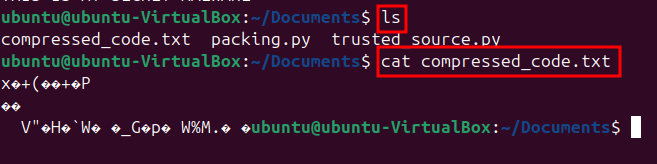
- A path to a trusted source file is created by joining the script directory with ‘’trusted_source.py’’. For this example the trusted_source.py is a simple python code to print the text “THIS IS MY SECRET MALWARE”
- The code from the trusted source file is read using the ‘with open(source_file_path, ‘r’) as file:’ statement.
4. Code Compression:
- The code from the trusted source file is compressed using the ‘compress_code’ function.
- The compressed code is printed using ‘print(“Compressed Code:”)’ and ‘print(compressed_code)’.
5. Code Decompression:
- The compressed code is decompressed using the ‘decompress_code’ function.
- The decompressed code is stored in the ‘decompressed_code’ variable.
6. Compressed Code Saving:
- A path for the compressed file is created by joining the script directory with ‘’compressed_code.txt’’.
- The compressed code is saved to a file using the ‘with open(compressed_file_path, ‘wb’) as file:’ statement.
7. Code Execution:
- The decompressed code is executed using the ‘exec’ function.
- If an exception occurs during execution, it is caught and an error message is printed.

The script demonstrates a basic obfuscation technique where the source code is compressed and decompressed. This makes it harder for an attacker to analyze the code directly. The execution of the decompressed code is a self-replicating behavior, similar to the concept of a virus or malware.
However, this script is a simplified example and does not provide any real-world security benefits. It’s important to note that obfuscation and self-replication are not inherently harmful, but they can be used to evade detection or to carry out malicious activities.
It’s crucial to use obfuscation techniques judiciously and with caution to avoid unintended consequences. Proper security measures, such as code signing and digital signatures, should be employed alongside obfuscation to enhance the overall security of the code.

Code Obfuscation Script
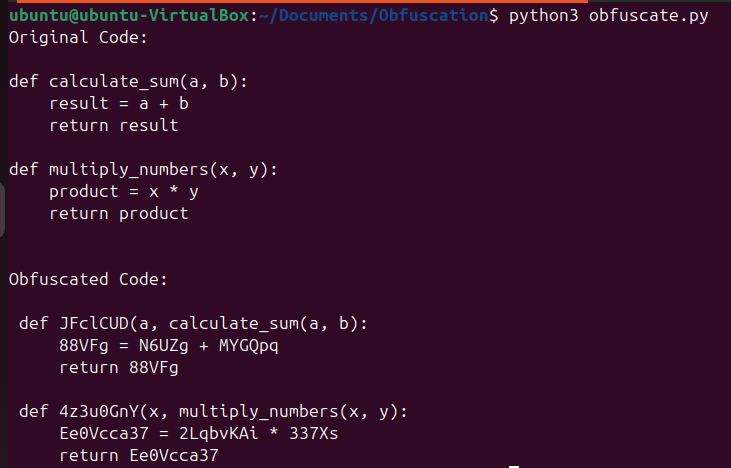
We have already mentioned an obfuscation example, lets use now one a little more advanced.
import random
import string
import keyword

# Function to generate a random string of a given length
def generate_random_string(length):
    letters = string.ascii_letters + string.digits
    return ''.join(random.choice(letters) for _ in range(length))

# Function to obfuscate variable names and function names in Python code
def obfuscate_code(code):
    obfuscated_code = []
    identifiers = {}
    reserved_keywords = set(keyword.kwlist)  # Reserved Python keywords

    # Split the code by lines to preserve indentation
    lines = code.splitlines()

    for line in lines:
        stripped_line = line.strip()  # Strip leading/trailing spaces
        if not stripped_line:  # Handle empty lines
            obfuscated_code.append(line)
            continue

        tokens = stripped_line.split()  # Tokenize the stripped line
        new_line = []

        for i, token in enumerate(tokens):
            # Handle function definitions explicitly
            if token == "def" and i + 1 < len(tokens):
                func_name = tokens[i + 1].split("(")[0]  # Extract function name
                if func_name not in identifiers:
                    random_string = generate_random_string(random.randint(5, 10))
                    identifiers[func_name] = random_string
                new_line.append("def")
                new_line.append(identifiers[func_name] + tokens[i + 1][len(func_name):])  # Add obfuscated name with the original parentheses
                continue

            # Obfuscate other identifiers (variables)
            if token.isidentifier() and token not in reserved_keywords:
                if token not in identifiers:
                    random_string = generate_random_string(random.randint(5, 10))
                    identifiers[token] = random_string
                new_line.append(identifiers[token])
            else:
                new_line.append(token)  # Keep other tokens (e.g., keywords, symbols) as is

        # Rebuild the line with preserved indentation
        leading_spaces = len(line) - len(stripped_line)
        obfuscated_code.append(" " * leading_spaces + " ".join(new_line))

    return "\n".join(obfuscated_code)

# Original code (example Python code to obfuscate)
code = '''
def calculate_sum(a, b):
    result = a + b
    return result

def multiply_numbers(x, y):
    product = x * y
    return product
'''

# Obfuscate the code (variable names and function names)
obfuscated_code = obfuscate_code(code)

# Print the original and obfuscated code
print("Original Code:")
print(code)
print("\nObfuscated Code:")
print(obfuscated_code)
The provided code snippet is a Python script that demonstrates a basic form of obfuscation and self-replication. Let’s break down the code and explain its function:
1. Compression Function:
— The ‘compress_code’ function takes a string (code) as input.
— It uses the ‘zlib’ module to compress the code using the ‘compress’ function.
— The compressed code is returned as a binary object.
2. Decompression Function:
— The ‘decompress_code’ function takes a binary object (compressed_code) as input.
— It uses the ‘zlib’ module to decompress the code using the ‘decompress’ function.
— The decompressed code is returned as a string.
3. Source Code Reading:
— The script determines the absolute path of the current script using ‘os.path.abspath(__file__)’.
— It then determines the directory of the script using ‘os.path.dirname(script_path)’.
— A path to a trusted source file is created by joining the script directory with ‘’trusted_source.py’’.
— The code from the trusted source file is read using the ‘with open(source_file_path, ‘r’) as file:’ statement.
4. Code Compression:
— The code from the trusted source file is compressed using the ‘compress_code’ function.
— The compressed code is printed using ‘print(“Compressed Code:”)’ and ‘print(compressed_code)’.
5. Code Decompression:
— The compressed code is decompressed using the ‘decompress_code’ function.
— The decompressed code is stored in the ‘decompressed_code’ variable.
6. Compressed Code Saving:
— A path for the compressed file is created by joining the script directory with ‘’compressed_code.txt’’.
— The compressed code is saved to a file using the ‘with open(compressed_file_path, ‘wb’) as file:’ statement.
7. Code Execution:
— The decompressed code is executed using the ‘exec’ function.
— If an exception occurs during execution, it is caught and an error message is printed.
The script demonstrates a basic obfuscation technique where the source code is compressed and decompressed. This makes it harder for an attacker to analyze the code directly. The execution of the decompressed code is a self-replicating behavior, similar to the concept of a virus or malware.
However, this script is a simplified example and does not provide any real-world security benefits. It’s important to note that obfuscation and self-replication are not inherently harmful, but they can be used to evade detection or to carry out malicious activities.
Remember, the effectiveness of these techniques depends on the sophistication of the attacker and the sophistication of the packing and obfuscation techniques used by the attacker. Advanced techniques may not always be effective against the most skilled attackers.
It’s crucial to use obfuscation techniques judiciously and with caution to avoid unintended consequences. Proper security measures, such as code signing and digital signatures, should be employed alongside obfuscation to enhance the overall security of the code.
Please note that these scripts are for educational purposes and should not be used for malicious activities. Proper security measures should be implemented to protect against packing and obfuscation techniques.

Khal4n1
Security Researcher & Red Teamer