
10-Days of learning – Day 10 - Signing and Certification for Malware

Final topic on this series (that felt like a marathon for all the time, sorry about that), Signing and certification, this is really important security measure that is used to verify the authenticity and integrity of software, so this basically helps against unauthorized modifications, tampering and to avoid false positives on malware detection.
Signing and certification are used to digitally sign the files or executable and the way to do it is by creating two keys, a private key, which is kept secret by the author, and a public key which is distributed with the software, then a user downloads or run the program and the signature is verified using the public key to ensure that the software is legit, mentioning all these processes, we can conclude that if the signature doesn’t match, it means the software has been modified or tampered.
So, this its ensuring the 3 principles of security, confidentiality, integrity and availability, and not just for the system but also of its resources,. Lets talk a little of the examples of both things”
- Code Signing: As already mentioned, code signing is the process of digitally signing the malware files or executables. Distributing the public key and comparing it with the private key to check the authenticity.
- Certification: Certification is the process of obtaining a certificate from a trusted certificate authority (CA) to sign the software, which can be translated to, where we get the signatures. The certificate is used to verify the identity of the malware author and to establish the trustworthiness of the software. Certificates can be used to sign executable files, scripts, or entire malware packages.
Maybe a little confusing, but, let’s make a quick examples snippet to make it more clear, we are having 3 scenarios here:
1- Malware with a fake certificate
2- Manipulation of a signed program detection
3- Non signed malware (most common)
Lets go each one of them.

1- Malware with a fake certificate
Scenario: An attacker creates a malware and want it to look legit, what can he do? sign it digitally.
First we need to create the keys.
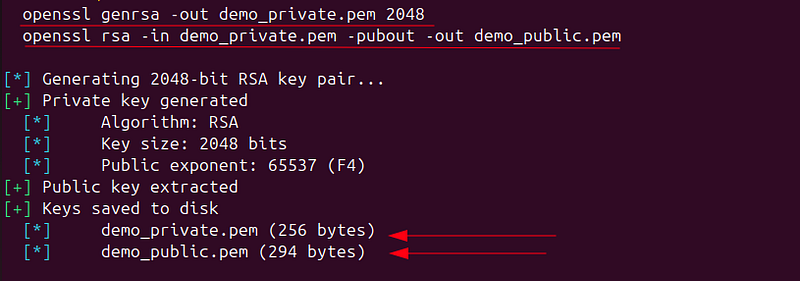
This uses the Public Exponent 65537 which is a prime number special called F4 (fourth number of Ferman: 2¹⁶+1) this number is big enough for security, only has 2 bits on binary 10000000000000001, and its a standard on RSA, SSL/TLS and SSH.
Now we are creating the FAKE certificate, which is a self-signed certificate and because of this there is no Certificate Authority (CA) behind this. Why this MIGHT works? because some users never check the origin of the certificate, they just see its signed and trust.
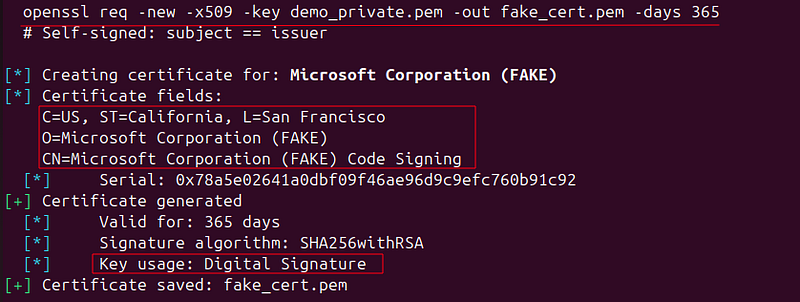
We can see the serial number (that looks legit), it says Microsoft Corporation, it uses SHA-256 which is standard algorithm to use, and the Key Usage is set to Digital Signature, which is correct for code signing. So basically all looks legit, except that is self-signed.
Now we need to create the malicious file. in this case we will make a “fake_Windows_update.exe” which will have the magic byts ‘MZ’ for a Portable Executable (PE) for Windows; also contains the “malicious payload” and … well, it looks like a windows update legit by Microsoft.
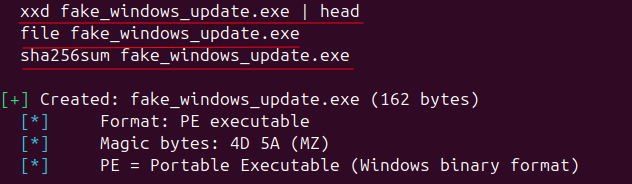
Great! we got now the malicious file, not it comes the signing. First we would need to calculate the hash SHA-256 of the whole file, then encrypt the has with the PRIVATE KEY, the result of this is the DIGITAL SIGNATURE.
As a reminder the Digital Signature is the one used to protect the integrity of the file.
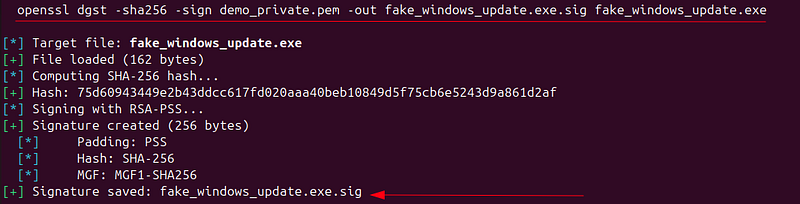
Perfect, now we got the malware signed, now lets simulate a user receive the file and start the verification process. He/She will calculate the hash, decrypt it with the public key, compare hashes, and if it fits then the signature is “valid”.
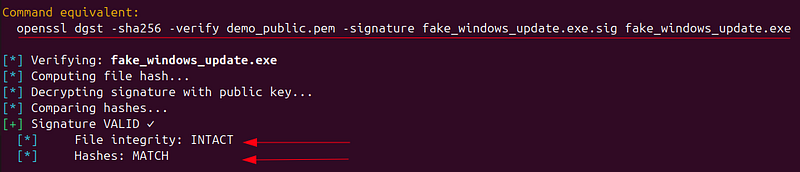
But WAIT, the signature is valid, but this doesnt mean its safe!, this just means:
- File was not modified.
- File was signed with the private key.
What doesnt mean?
- The software is legit.
- The certificate is trustworthy.
- It’s not malware.
But here we are to be good people not bad, so what can we do? This is the process that forensics researchers do in these cases:
- Check all the fields of the certificate
- Check if its self-signed
- Check if its expired
- Check the extensions used.
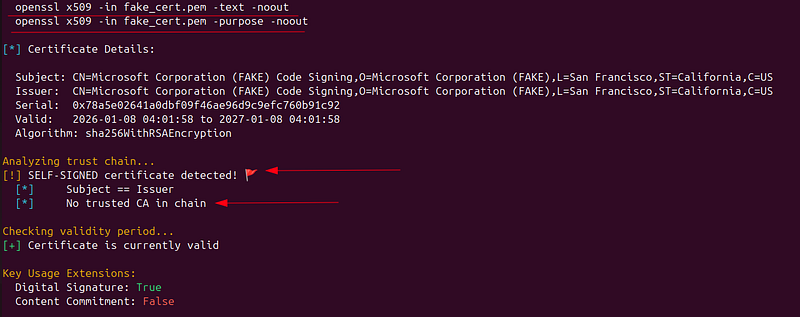
As you can see,ther is no trusted CA chain, no CA, no nothing, so this will raise all the alerts that anyone could create the certificate.
The conclusion is that:
- Valid Signature ≠ Safe File
- ALWAYS we need to check the whole certificate.
- self-signed = more research required
2- Manipulation of a signed program detection
Scenario: An attacker modifies a signed file, this could mean a Man in the Middel Attack (MiTM), Code Injection (post signing), or backdoor added.
For the purpose of this article, lets reuse our own signed software.

Good, lets modify the file and call it fake_windows_update_MODIFIED.exe, this will simulate an attacker injecting malicious code to the file, a backdoor or modify a functionality, BUT we cannot regenerate the signature as the attacker doesn’t have the Private Key.
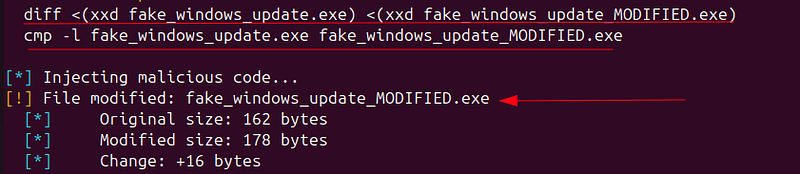
For these kind of attackers, the malicious actors can play with the file size to be more subtle (but the signature will keep the same anyway).
Alright, moment of truth, analyze the modified file using the original signature.

Awesome! as expected, the signature is invalid, and this means that the file integrity has been tampered, which demonstrates that the signature is a good measure against these attacks.
3- Non signed malware (most common)
Scenario: The reality is that most of the malware is not signed, why? because getting certificates costs money, stolen certificates , although possible, are rare; there is a risk of being tracked down if the attacker uses a valid certificate and so on.
In this scenario the “malware” created has no signature, which is a typical case of trojans, ransomware, keyloggers or any info stealer. This example will use a file called “trojan_downloader.exe”
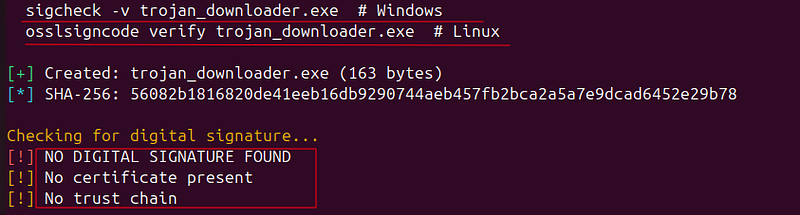
As you can see in the picture above we have analyze it, and we can detect that there is no signature, certificate or trust chain that let us know that the software is a valid program. When this happens, Windows SmartScreen will pop up a big warning, also, antivirus likely will detect them, the web browsers might block the download and the email gateway should catch the file. BUT if nothing of this happens then its a red flag to review the file specs.
Please note that this script is for educational purposes and should not be used for malicious activities. Proper security measures should be implemented to protect against signing and certification techniques.
AND THIS IS IT!!! We got to the end of this journey of learning about malware. This experience has been great for me, I have enjoyed sharing what I know about this topic, more will come on this year for sure and related so many other topics. This 2026 will be wild for sharing info.
Thanks for all the support, sharing, and reading me. Remember that sharing is caring and keep your mind curious in all topics. Have a great begin of the year.

Khal4n1
Security Researcher & Red Teamer